Adding a MOAR rewrite directive
This guide describes how to add your own rewrite directive to MOAR. It uses the
existing chaining directive as an illustrative example. Steps 1 to 6 show the
code you need to implement and register for any directive. The testing sections
show how to confirm that MOAR can use your directive during a search.
The chaining directive
The chaining directive is already part of DocETL, so you do not need to add
it. We walk through its existing implementation so you can see how to structure
a directive of your own. A chaining rewrite replaces one complex operation with
a sequence of simpler map operations. Each new map handles one part of the
original task, and a later map can use output from an earlier map.
Op => Map* -> Op
The code examples follow the implementation in
docetl/reasoning_optimizer/directives/chaining.py.
Example application
The medical pipeline below is an example input for chaining, not part of the directive implementation. Suppose the pipeline contains a map operation that must identify newly diagnosed conditions and associate treatments with them in one call.
Example input, the pipeline author's operation
The pipeline author writes the original operation. The directive receives the operation as input during optimization.
- name: extract_new_treatments
  type: map
  prompt: |
    From this discharge summary, extract every treatment
    prescribed specifically for a newly diagnosed condition.

    {{ input.summary }}
  output:
    schema:
      treatments: list[str]
The operation combines two dependent decisions:
- Which conditions are newly diagnosed?
- Which treatments were prescribed for those conditions?
MOAR can apply chaining to replace the operation with two dependent maps.
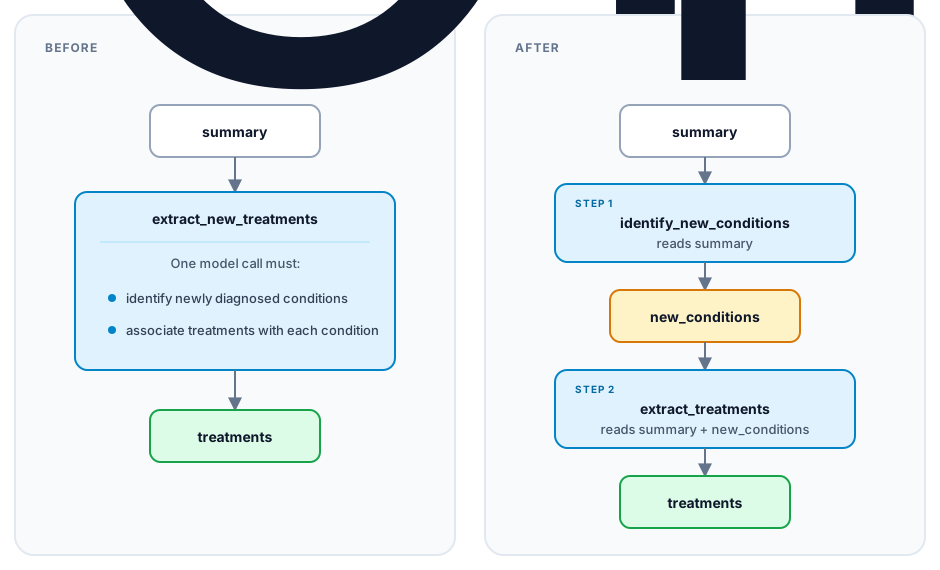
Both plans accept summary and produce treatments. In the changed plan,
new_conditions is an intermediate result for the second map.
How MOAR uses a directive
MOAR uses the same process for every directive.
- The search agent reads
name,formal_description,nl_description, andwhen_to_use, then selects a directive and one or more target operations. - The directive asks the rewrite agent for an object that matches the instantiate schema.
- Your validation code checks the proposed configuration.
apply()returns a new operation list, and DocETL statically validates the complete candidate pipeline before executing it.- MOAR runs the candidate and evaluates its accuracy and cost.
The schema limits what the rewrite agent may return. The apply() method builds
the changed pipeline without another model call.
The next six sections walk through each part of the existing chaining implementation. Use the same sequence when you define a directive of your own. The medical application appears in each step so you can see how the directive handles a specific operation.
1. Define the instantiate schema
In this step, you define the Pydantic model for the rewrite agent's output.
DocETL calls the model an instantiate schema. Add the schema to
docetl/reasoning_optimizer/instantiate_schemas.py.
Your code, the instantiate schema
You write the following classes to define the fields that the rewrite agent must return.
class MapOpConfig(BaseModel):
    name: str
    prompt: str
    output_keys: list[str]


class ChainingInstantiateSchema(BaseModel):
    new_ops: list[MapOpConfig]
Runtime example, output from the rewrite agent
At runtime, the rewrite agent may return the following object for the medical operation. A pipeline author does not write the object.
ChainingInstantiateSchema(
    new_ops=[
        MapOpConfig(
            name="identify_new_conditions",
            prompt="""
            Read this discharge summary:

            {{ input.summary }}

            List only conditions explicitly described as newly diagnosed.
            """,
            output_keys=["new_conditions"],
        ),
        MapOpConfig(
            name="extract_treatments",
            prompt="""
            Read this discharge summary:

            {{ input.summary }}

            Newly diagnosed conditions:
            {{ input.new_conditions }}

            List the treatments prescribed for each new condition.
            """,
            output_keys=["treatments"],
        ),
    ]
)
Use narrow fields and describe them clearly. If a directive needs only two prompts and their output keys, do not ask the agent to return an entire pipeline.
2. Validate the agent's proposal
In this step, you reject agent output that cannot produce a valid pipeline. For chaining, reject the agent's proposal unless all of the following statements are true:
- Every generated map prompt contains an
{{ input.<key> }}reference. - Every input key used by the original operation appears in at least one new prompt.
- The last map declares exactly the original operation's output keys.
In the medical example, summary is a required input and treatments is the
required final output. A chain that ends at new_conditions is invalid.
The later map may use {{ input.new_conditions }} because the earlier map
produces new_conditions. After apply() runs, DocETL also checks the complete
pipeline without running it. If a directive has stricter rules for dependencies,
check the rules in its instantiate schema. MOAR can then reject an error before
execution.
The agent can return an invalid or incomplete configuration even when you use
structured output. Return the validation error to the agent, and limit the
number of retries. The directives included with DocETL use
MAX_DIRECTIVE_INSTANTIATION_ATTEMPTS as their shared limit.
3. Describe when MOAR should use the directive
In this step, you describe the directive so the search agent knows when to
choose it. Create a subclass of Directive under
docetl/reasoning_optimizer/directives/. The search agent reads the four
descriptive fields when it chooses a directive.
class ChainingDirective(Directive):
    name: str = Field(default="chaining")
    formal_description: str = Field(default="Op => Map* -> Op")
    nl_description: str = Field(
        default=(
            "Decompose a complex operation into a sequence by inserting one "
            "or more Map steps that rewrite the input for the next operation."
        )
    )
    when_to_use: str = Field(
        default=(
            "When the original task is too complex for one step and should be "
            "split into a series of dependent steps."
        )
    )
    instantiate_schema_type: Type[BaseModel] = ChainingInstantiateSchema
Write when_to_use so the search agent can choose among the available
directives. Describe a property that the search agent can find in a target
operation. For example, chaining applies when an operation contains dependent
reasoning steps. Do not claim that every use of the directive improves
accuracy.
The base class also requires an example and may include test_cases. The
rewrite agent receives the example in its prompt. Use a complete example that
preserves the input fields, output fields, and prompt instructions.
4. Generate and validate a rewrite instance
In this step, you ask the rewrite agent for a configuration and check the
configuration against the schema. Use to_string_for_instantiate() and
llm_instantiate() for the model call.
response = completion(
    model=agent_llm,
    messages=messages,
    response_format=ChainingInstantiateSchema,
)

payload = json.loads(response.choices[0].message.content)
rewrite = ChainingInstantiateSchema(**payload)
ChainingInstantiateSchema.validate_chain(
    new_ops=rewrite.new_ops,
    required_input_keys=expected_input_keys,
    expected_output_keys=expected_output_keys,
)
Return the schema, updated message history, and model call cost from
llm_instantiate(). MOAR adds the rewrite agent call cost to the total search
cost.
Use instantiate() to complete the following work in order:
- Check the number and types of target operations.
- Read the target's required input and output keys.
- Call
llm_instantiate(). - Call the deterministic
apply()method. - Return
(new_ops, message_history, call_cost).
MOAR provides every directive with additional values such as the optimization
goal and dataset. It also provides the allowed models and input path. Accept
**kwargs when the directive does not use every value.
5. Apply the rewrite
In this step, you build the changed pipeline from the validated configuration.
Do not call a model from apply(). Copy the operation list and build the
replacement operations, then return the new list. The main part of the chaining
implementation follows.
def apply(self, global_default_model, ops_list, target_op, rewrite):
    new_ops_list = deepcopy(ops_list)
    position = next(
        i for i, op in enumerate(new_ops_list) if op["name"] == target_op
    )
    original = new_ops_list[position]
    model = original.get("model", global_default_model)

    replacement = []
    for index, step in enumerate(rewrite.new_ops):
        output = (
            original["output"]
            if index == len(rewrite.new_ops) - 1
            else {
                "schema": {key: "string" for key in step.output_keys}
            }
        )
        replacement.append(
            {
                "name": step.name,
                "type": "map",
                "prompt": step.prompt,
                "model": model,
                "litellm_completion_kwargs": {"temperature": 0},
                "output": output,
            }
        )

    new_ops_list[position : position + 1] = replacement
    return new_ops_list
The last map uses the original output block. The changed pipeline therefore has the same final output fields and field types as the original pipeline.
6. Register the directive
In this step, you make the directive available to MOAR. Import the directive and
add an instance to docetl/reasoning_optimizer/directives/__init__.py.
from .my_directive import MyDirective

ALL_DIRECTIVES = [
    # ...
    MyDirective(),
]
After you add the instance to ALL_DIRECTIVES, the accuracy search can use the
directive. The code also adds the directive to DIRECTIVE_REGISTRY. Update
__all__ as well.
Register the directive in another list only when one of the following conditions applies:
| Registry | Add the directive when |
|---|---|
ALL_COST_DIRECTIVES |
The search agent should consider it during cost optimization. |
MULTI_INSTANCE_DIRECTIVES |
MOAR should ask for two distinct instantiations per selection. |
DIRECTIVE_GROUPS |
After a poor result, MOAR should skip equivalent rewrites for the same operation. |
Only add a directive to the cost list when you can explain how it may reduce cost. A rewrite that only adds model calls normally belongs in the accuracy search.
Test the directive
Test code that does not call a model separately from tests that call a model.
Schema tests
Test valid and invalid configurations directly. At minimum, test a missing original input and a missing final output. Also test an empty chain and duplicate operation names. If the directive limits intermediate fields, test a reference to a field that no earlier operation produced.
def test_chaining_rejects_wrong_final_output():
    rewrite = ChainingInstantiateSchema(
        new_ops=[
            MapOpConfig(
                name="identify_new_conditions",
                prompt="Read {{ input.summary }}",
                output_keys=["new_conditions"],
            )
        ]
    )

    with pytest.raises(ValueError, match="do not match"):
        ChainingInstantiateSchema.validate_chain(
            rewrite.new_ops,
            required_input_keys=["summary"],
            expected_output_keys=["treatments"],
        )
Tests for apply()
Construct the schema by hand and call apply(). Check the operation order,
names, models, and intermediate schemas. Also check that the final output schema
matches the original schema. Add the test to
tests/reasoning_optimizer/test_directive_apply.py.
uv run pytest tests/reasoning_optimizer/test_directive_apply.py -k chaining
Tests for complete pipelines and several rewrites
An operation list can pass a test for apply() and still contain a broken input
reference. A later rewrite can also fail on an operation that the first rewrite
added. In tests/test_moar_multistep.py, add a test that updates the complete
pipeline and runs plan validation. When relevant, apply a second directive to
an operation that the first directive added.
uv run pytest tests/test_moar_multistep.py -k chaining
Live agent tests
Directive.run_tests() calls one model to create the rewrite and another model
to judge it. Use the command as an integration test, but keep the deterministic
tests described above.
uv run python -m tests.reasoning_optimizer.test_runner \
  --directive chaining \
  --model gpt-4.1
The command requires credentials for the selected model. Model output may vary between runs, so record the model, prompt version, test data, and pass rate over repeated runs.
Confirm that MOAR uses the directive
Check each stage separately because registration does not prove that MOAR selected the directive, built a valid pipeline, or improved the score.
| Claim | Check |
|---|---|
| Registered | Print the names in ALL_DIRECTIVES or DIRECTIVE_REGISTRY. |
| Available to search | Find the directive in the action counts in moar_tree_log.txt. |
| Selected | Look for Directive: <name>, Target ops: [...] in the console or a nonzero use count in the tree log. |
| Pipeline built | Open the generated <pipeline-name>_<node-id>.yaml and inspect the changed operations. |
| Helpful | Compare its score and cost with its parent, and check whether MOAR keeps it among the best plans. |
Confirm registration without making an LLM call.
uv run python -c \
  "from docetl.reasoning_optimizer.directives import ALL_DIRECTIVES; print([d.name for d in ALL_DIRECTIVES])"
Then run a small MOAR experiment with an explicit save_dir. MOAR writes the
search log to <save_dir>/moar_tree_log.txt.
rg -n "my_directive|Action: my_directive" results/moar_tree_log.txt
A zero use count means that the directive was available but MOAR did not select it. A nonzero count means that MOAR selected the directive. The count does not prove that MOAR built or ran the candidate, so also inspect the console output and generated YAML.
For a deterministic MOAR integration test, construct MOARSearch with
available_actions={MyDirective()} and a fixed test evaluation. The limited
action set prevents the search agent from choosing another directive. Also keep
a benchmark that includes every directive, because the search agent must
recognize when the new directive applies.
Implementation checklist
| Part | Chaining example |
|---|---|
| Pattern | One complex operation |
| Replacement | A sequence of map operations |
| Selection metadata | Use for dependent reasoning steps |
| Instantiate schema | A list of map names, prompts, and output keys |
| Validation | Preserve original inputs and final output contract |
| Apply | Replace one operation with the generated sequence |
| Tests without model calls | Schema, operation shape, and static plan validity |
| Tests with models and data | Selection rate, execution success, accuracy, and cost |